The cloud POS your restaurant deserves
Orders, kitchen display, GST billing, inventory, team management, and 13 report types — cloud-based, works on any device. Built for Indian F&B.
No credit card · 15-day free trial · No hardware needed
Product information
See SynexPOS before you decide
The full demo, real screens from the app, and the facts in one place.
Why switch
Running a restaurant is hard enough.
Your billing software shouldn't be.
Most POS systems are built for chains with dedicated IT teams. Yours should work out of the box.
Paper KOTs get lost
Handwritten tickets vanish, get misread. Kitchen prepares wrong items, customers wait.
Manual billing = GST errors
Splitting CGST/SGST by hand every quarter is a nightmare your CA dreads.
No visibility into the business
No idea what sells, what’s wasted, which waiter is performing — until it’s too late.
Digital KOT to kitchen screen
Every order appears on kitchen display instantly. Chefs mark preparing → served. No paper.
Auto GST invoicing, one tap
CGST, SGST, IGST split automatically. Sequential invoices. Print or WhatsApp.
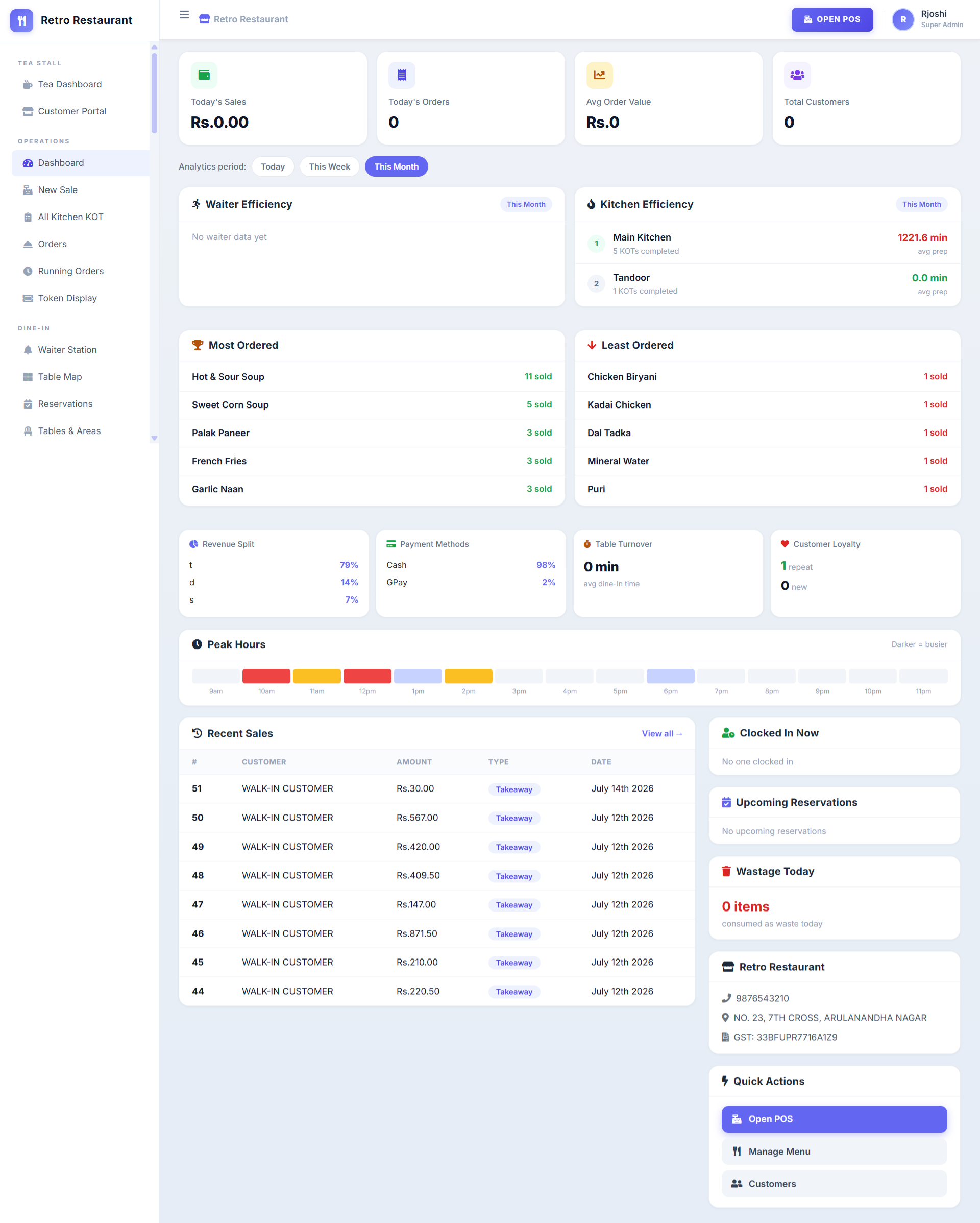
13 reports on your phone
Sales, kitchen orders, waiter efficiency, wastage, expenses — updated live.
Core features
Everything you need to run your restaurant
Six modules, one dashboard. Each works together so you never switch between apps.
Order Management
Take orders in 2 taps. Dine-in, takeaway, delivery — all from one screen with token display and running order tracking.
- New Sale with quick item search
- Running Orders & Token Display
- Dine-in, takeaway, delivery modes
- Split bill by item or equal share
Kitchen Display (KOT)
Every order fires a digital KOT to the kitchen screen. Chefs track pending → preparing → served. Multi-station routing built in.
- Real-time push to kitchen displays
- All Kitchen KOT view
- Kitchen Settings per station
- Color-coded priority and timing
Dine-in Management
Visual table map, waiter station assignments, and a full reservation system — built in, not a paid add-on.
- Table Map with areas
- Waiter Station assignment
- Reservations with pax count
- Table turnover tracking
Delivery & Online Orders
Manage online orders, assign delivery executives, and monitor COD collections — all from the same dashboard.
- Online Orders management
- Delivery Executive tracking
- COD Monitoring
- Order status updates
Inventory & Barcode
Track stock, manage suppliers, log purchases, handle returns — with built-in barcode entry and printing.
- Products with stock tracking
- Purchases & Suppliers
- Purchase Returns
- Barcode Entry & Print
Finance & Expenses
Full financial view — sales, payments, due payments, accounts, expenses with categories, and recurring expense tracking.
- Sales List & Payments
- Due Payments tracking
- Accounts & Transactions
- Expenses & Recurring Expenses
Also included
Modules competitors charge extra for
Menu management, customer loyalty, team management, and multi-branch — all included in every plan.
🍳 Menu Management
Full control over your menu with categories, modifiers, and brands. Update from any device.
- Menu Items
- Categories
- Modifiers
- Brands
👥 Customer Management
Track customers, create groups, manage discounts, and see repeat vs new customer loyalty metrics.
- Customer list
- Customer Groups
- Discounts
- Loyalty tracking
👨🍳 Team Management
Employee attendance, categories, salary payments, waiter efficiency — manage your team, not just your orders.
- Attendance (Clock in/out)
- Employee Categories
- Salary Payments
- Waiter Efficiency reports
🏢 Multi-Branch
Run multiple locations from one login. Each branch gets its own data, menu, and team — unified reporting.
- Branch management
- Per-branch menu & staff
- Consolidated reporting
- Export Data per branch
Reports
13 report types, all exportable
From daily consolidated to GSTR-1 ready tax summaries — everything your CA needs, one click away.
Integrations
Works with the tools you already run on
Connect online orders, payments and tax filing — no double entry, no reconciliation headaches.
Swiggy
Online orders drop straight onto your KOT and sales reports.
Zomato
Sync delivery orders & menu in real time — one screen for all channels.
Razorpay
Accept UPI & cards; payments reconcile automatically against each bill.
Send GST invoices & order updates to customers in one tap.
GST portal
Export GSTR-1-ready summaries your CA can file directly.
Migrate from any POS
Bring your menu & customers over from Petpooja or Posist — we help you switch.
Brand marks are placeholders — add official logos (with permission) when implementing.
Internet down? Your POS keeps billing.
Watch it bill without internetOur Windows desktop app is local-first— orders, bills and KOTs run from an on-device database, so a dropped connection never stops service. When you're back online, everything syncs to the cloud automatically. It's the Toast/Square model, built for Indian outlets with patchy internet.
Bill & print with zero internet
Take orders, generate GST bills and fire KOTs offline — nothing waits on a connection.
Local-first, on-device database
Data lives on the terminal, so billing is instant and never blocked by a dropped line.
Auto-sync when back online
Queued orders push to the cloud automatically — idempotent, so no duplicates, no lost sales.
Per-device invoice numbering
Each counter keeps its own invoice sequence, so multi-terminal outlets never clash.
Installable desktop app
A proper Windows app that auto-updates itself — no reinstalls, always current.
Same data, cloud + counter
Run online in the browser or offline on the desktop — one account, one dataset.
Built for
Every type of food business
Whether you run a single dhaba or a chain of cloud kitchens, the same POS adapts to your workflow.
Loved by owners
Restaurants that switched — and stayed
“Billing that took two minutes now takes ten seconds. And when our internet went down during dinner rush, the desktop app kept billing like nothing happened.”
“We run three cloud-kitchen brands from one login. Swiggy and Zomato orders land on the same KOT screen — no more juggling four tablets.”
“Set up my whole menu and went live the same evening — no engineer, no expensive machine. The waiter efficiency report alone paid for it.”
Trusted by 200+ outlets across cafés, QSRs and cloud kitchens.
Sample quotes & outlet count — replace with real, consented testimonials before launch.
FAQ
Questions restaurant owners ask
Does it really work without internet?
Yes. The Windows desktop app stores data on-device and lets you bill, print and fire KOTs with no connection. When you're back online, orders sync to the cloud automatically — no duplicates, no lost sales.
Do I need to buy special hardware?
No. SynexPOS runs on any device with a browser — phone, tablet, laptop or existing billing machine. For offline mode, install the free desktop app on your Windows counter PC.
Is GST billing supported?
Fully. CGST/SGST/IGST split automatically, invoices are sequential, and the GST report is GSTR-1 ready for your CA to file.
Can I move from Petpooja or Posist?
Yes — we help you import your menu and customers so you can switch without starting from scratch. Most outlets go live the same day.
How long does setup take?
Under 5 minutes. Sign up, add your menu, and start billing — no engineer or installation visit needed.
Pricing
Simple pricing, everything included
All features included — Online + Offline in one plan. No hidden add-on fees.
Free Trial 15 days | Paid Most popular | Custom Contact Sales | |
|---|---|---|---|
| Price | ₹0 for 15 days | ₹749 /mo | Let's talk |
| Online + Offline POS | |||
| All features & modules | |||
| Reports & integrations | |||
| Support | Community | Priority | Dedicated |
| Volume pricing & custom integrations | — | — | |
| Start Free Trial | Start Free Trial | Contact Sales |